Fedora
Alle Eigenheiten, Probleme, Lösungen usw. für Fedora Installationen und Ihre Software
Postgres Datenbank
Alle Informationen zu Postgres auf Fedora
Deinstallieren von Postgres auf Fedora
Quelle: https://kb.objectrocket.com/postgresql/how-to-completely-uninstall-postgresql-757
Be sure to elevate the privileges for any of the commands in this article with sudo if the terminal returns a Permission denied error.
Uninstall and remove PostgreSQL packages on Fedora Linux
You can use the DNF repository’s dnf command to uninstall PostgreSQL on Fedora-based distributions of Linux:
sudo dnf remove postgresql
To use a wildcard operator (*) to remove all packages with names beginning with postgres, use the following command:
sudo dnf remove postgres\*
Be sure to remove the pgsql directory as well:
sudo rm /var/lib/pgsql -d -r
Installieren von Postgres auf Fedora
Quelle: https://docs.fedoraproject.org/en-US/quick-docs/postgresql/
Installation
The installation and initialization of the postgresql server is a little bit different in comparison to other packages and other Linux distros. This document aims to summarize basic installation steps relevant to recent Fedora Linux releases.
sudo dnf install postgresql-server postgresql-contrib libpq
The postgresql server is not running and disabled by default. To set it to start at boot, run:
sudo systemctl enable postgresql
The database needs to be populated with initial data after installation. The database initialization could be done using following command. It creates the configuration files postgresql.conf and pg_hba.conf
sudo postgresql-setup --initdb --unit postgresql
To start the postgresql server manually, run
sudo systemctl start postgresql
Benutzer und Datenbank anpassen
Der Standard-Benutzer "postgres" sollte ein eigenes Passwort bekommen, dies sollte je nach Unternehmen gesetzt werden, da sonst Probleme mit einigen Apps/Software auftreten können.
sudo -u postgres psql
Sie befinden sich nun in der Postgres-Konsole unter "postgres=#" zu erkennen.
\password postgres
Jetzt tippen Sie das neue Passwort zwei mal ein.
Konfiguration für Postgres anpassen
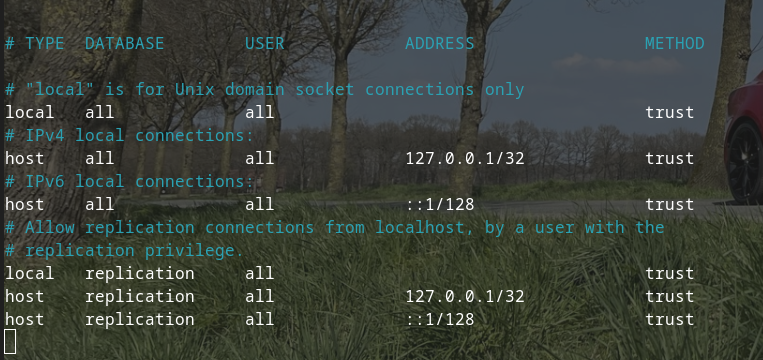
In der HBA Konfiguration von Postgres alle angaben rechts auf "trust" setzen.
sudo nano /var/lib/pgsql/data/pg_hba.conf