Be sure to elevate the privileges for any of the commands in this article with `sudo` if the terminal returns a `Permission denied` error.
## Uninstall and remove PostgreSQL packages on Fedora Linux You can use the DNF repository’s `dnf` command to uninstall PostgreSQL on Fedora-based distributions of Linux: `sudo dnf remove postgresql` To use a wildcard operator (`*`) to remove *all* packages with names beginning with `postgres`, use the following command: `sudo dnf remove postgres\*` Be sure to remove the `pgsql` directory as well: `sudo rm /var/lib/pgsql -d -r` # Installieren von Postgres auf Fedora Quelle: [https://docs.fedoraproject.org/en-US/quick-docs/postgresql/](https://docs.fedoraproject.org/en-US/quick-docs/postgresql/) ### Installation The installation and initialization of the postgresql server is a little bit different in comparison to other packages and other Linux distros. This document aims to summarize basic installation steps relevant to recent Fedora Linux releases. `sudo dnf install postgresql-server postgresql-contrib libpq` The postgresql server is not running and disabled by default. To set it to start at boot, run: `sudo systemctl enable postgresql` The database needs to be populated with initial data after installation. The database initialization could be done using following command. It creates the configuration files postgresql.conf and pg\_hba.conf `sudo postgresql-setup --initdb --unit postgresql` To start the postgresql server manually, run `sudo systemctl start postgresql` ### Benutzer und Datenbank anpassen Der Standard-Benutzer "postgres" sollte ein eigenes Passwort bekommen, dies sollte je nach Unternehmen gesetzt werden, da sonst Probleme mit einigen Apps/Software auftreten können. `sudo -u postgres psql` Sie befinden sich nun in der Postgres-Konsole unter "postgres=#" zu erkennen. `\password postgres` Jetzt tippen Sie das neue Passwort zwei mal ein. ### Konfiguration für Postgres anpassen In der HBA Konfiguration von Postgres alle angaben rechts auf "trust" setzen. `sudo nano /var/lib/pgsql/data/pg_hba.conf` [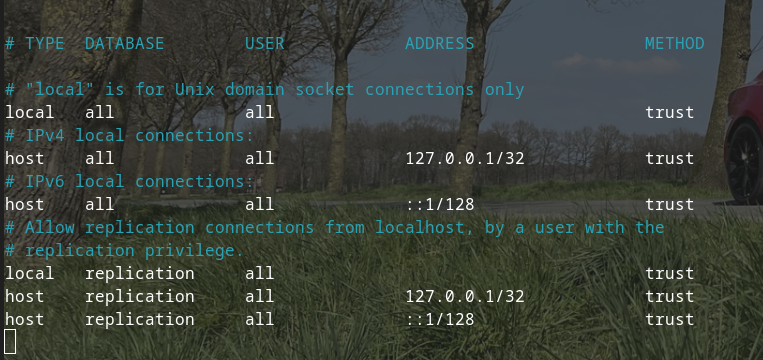](https://docs.liquidmagic.de/uploads/images/gallery/2023-05/HJ6dt5Y49pl2sHHx-bildschirmfoto-vom-2023-05-15-14-12-03.png)